


 Buy a Licensed Company
  Explore VASP Data
  Talk to an Expert

 Atis Shala
Atis is a senior analyst and community lead with four years of experience in crypto. He has a bachelor from the Rochester Institute of Technology.
Atis Shala
Atis is a senior analyst and community lead with four years of experience in crypto. He has a bachelor from the Rochester Institute of Technology.
What Is a Crypto Cold Wallet? The Complete 2026 Guide
A crypto cold wallet is a physical device or offline storage method that keeps your cryptocurrency private keys completely disconnected from the internet.
In the world of crypto, security is the foundation of ownership. As we move through 2026, the landscape of cryptocurrency theft has evolved. With hackers utilizing AI-driven phishing attacks and sophisticated malware to drain online exchanges, the concept of “self-custody” has never been more critical.
Unlike “hot wallets,” software applications on your phone or laptop that remain perpetually connected to the internet, cold wallets provide an air-gapped environment. This means there is a physical barrier between your assets and the digital world. For investors holding significant portfolios, a cold wallet is the digital equivalent of a bank vault that only you can access.

Key Takeaways
- Total Isolation: Cold wallets store private keys offline, making them immune to remote hacking, malware, and exchange collapses.
- The “Air Gap” Defense: By physically severing the connection to the internet, cold storage ensures that no digital threat can breach the device.
- Self-Sovereignty: Using a cold wallet means you are your own bank. You do not rely on third-party permissions to access or move your funds.
- Investment Threshold: Security experts generally recommend transitioning to cold storage once your crypto holdings exceed $1,000 USD.
How Does a Cold Wallet Work?
To understand how a cold wallet protects your funds, you first need to understand what a “wallet” actually does. Contrary to popular belief, a crypto wallet does not store your Bitcoin or Ethereum. Your coins live on the blockchain network. The wallet stores your private key, the cryptographic password that grants you the right to move those coins.
The Mechanics of the “Air Gap”
The magic of a cold wallet lies in its isolation. When you use a software wallet on your phone, your private keys are often held in the device’s memory, which is connected to the internet. If you accidentally click a malicious link or download malware, a hacker can theoretically read that memory and steal your keys.
A cold wallet eliminates this vector entirely.
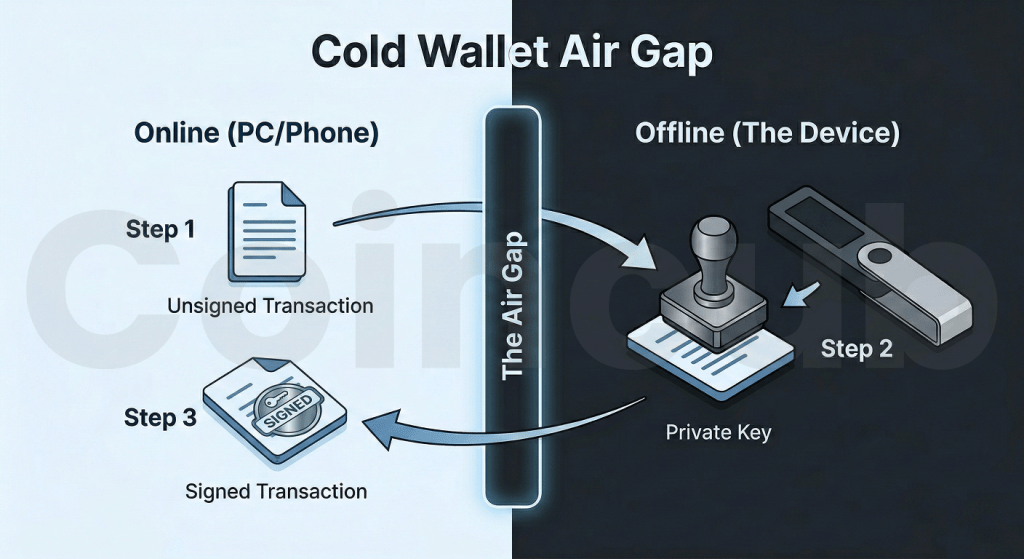
When you need to send a transaction, you connect the cold wallet (usually via USB or QR code) to a computer. The computer sends the transaction details into the cold wallet. The device then signs the transaction internally, using the private key that is locked inside its secure chip. Once signed, the device sends only the digital signature back to the computer to be broadcast to the network.
Crucially, the private key never leaves the device. Even if the computer you are using is infected with the worst viruses imaginable, the virus cannot “jump” into the cold wallet to extract your key because the device is designed to only output signed transaction data, never the key itself.
Cold Wallet vs. Hot Wallet: Understanding the Distinction
The debate between hot and cold storage comes down to a trade-off between convenience and security.
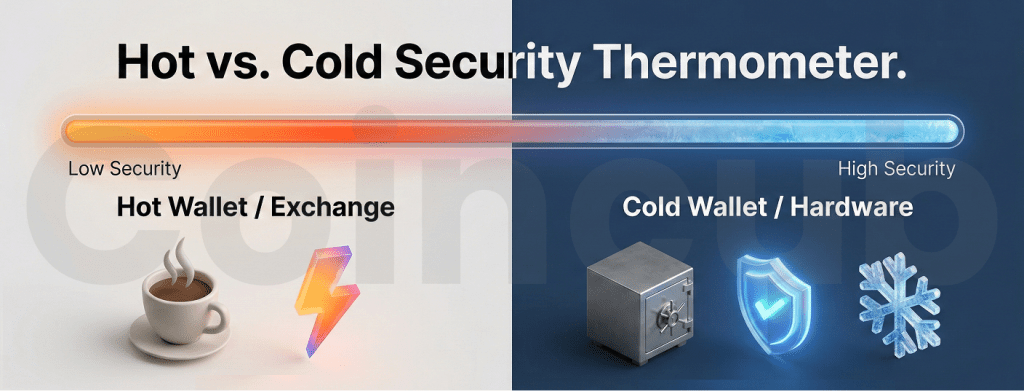
A hot wallet (like MetaMask, Phantom, or an exchange app) is designed for speed. It is always online, allowing you to trade, swap, and interact with DeFi applications instantly. However, this constant connectivity makes it a prime target for cyberattacks.
A cold wallet is designed for preservation. It is cumbersome for day trading because it requires physical interaction to approve every transaction. However, this friction is exactly what makes it secure. It acts as a deliberate speed bump, preventing unauthorized access.
Comparison at a Glance
| Feature | Cold Wallet (Hardware) | Hot Wallet (Software/Exchange) |
| Connectivity | Offline (Air-gapped) | Online (Always Connected) |
| Primary Risk | Physical loss or theft of the device | Remote hacking, phishing, malware |
| Custody | Self-Custody (You hold the keys) | Third-Party (Exchange holds keys) or Self-Custody |
| Cost | $50 – $250+ | Generally Free |
| Ideal Use Case | Long-term savings (“HODLing”) | Daily trading and small payments |
In a balanced crypto strategy, most investors use both. They keep a “checking account” amount in a hot wallet for daily use, while the vast majority of their wealth sits securely in cold storage.
Types of Crypto Cold Wallets
While the term “cold wallet” is often used synonymously with hardware devices, it actually refers to a category of storage methods. In 2026, there are three primary ways to achieve cold storage, ranging from user-friendly devices to advanced, paranoid-level security setups.
Hardware Wallets
For 99% of investors, a hardware wallet is the correct choice. These are specialized electronic devices, often resembling USB drives or thick credit cards, engineered specifically to generate and store private keys.
Leading brands like Ledger, Trezor, and Tangem dominate this space. Modern hardware wallets are built with Secure Element (SE) chips, the same military-grade technology found in passports and credit cards. These chips are resistant to physical tampering, meaning that even if a thief stole your device and hooked it up to a supercomputer, they would struggle to extract the key without your PIN.
Paper Wallets
In the early days of Bitcoin, paper wallets were the standard for cold storage. A user would generate a key pair on an offline computer, print the keys and QR codes onto a piece of paper, and then delete the digital files.
However, in 2026, paper wallets are largely considered obsolete and dangerous for beginners. The risks are manifold: printers often cache data in their internal memory (which can be hacked), ink fades over time, and paper is highly susceptible to fire and water damage. Furthermore, if the computer used to generate the wallet wasn’t truly offline, the security is compromised from the start.
Deep Cold Storage
For institutions or individuals securing generational wealth, “deep cold” storage involves using standard consumer hardware that has been permanently altered. This usually involves taking a cheap laptop, physically removing its Wi-Fi card, Bluetooth module, and microphone, and using it solely to sign transactions via USB transfer.
While this offers the highest theoretical security, it requires a high level of technical expertise. If you mess up the file transfer process or the software setup, you risk losing access to your funds entirely. For most people, a commercial hardware wallet offers 99% of the security with significantly better usability.
Why You Need a Cold Wallet in 2026
If the history of cryptocurrency has taught us one lesson, it is this: exchanges are not banks.
In 2025 alone, hackers stole an estimated $3.4 billion from crypto platforms. The massive $1.46 billion breach of the Bybit exchange served as a brutal wake-up call that even top-tier giants are vulnerable to state-sponsored attacks. Unlike a traditional bank account, which is insured by the government (FDIC in the US), crypto held on an exchange has zero federal protection. If the platform is drained, your money is likely gone forever.
This reality brings us back to the core philosophy of crypto: “Not your keys, not your coins.”
When you leave assets on an exchange, you effectively own an IOU. You are trusting that company to have your money when you ask for it. A cold wallet converts that IOU into physical property. It ensures that no matter what happens to the market, the exchange, or the internet, your assets remain in your possession.
Why a Cold Wallet Matters More in Mid 2026
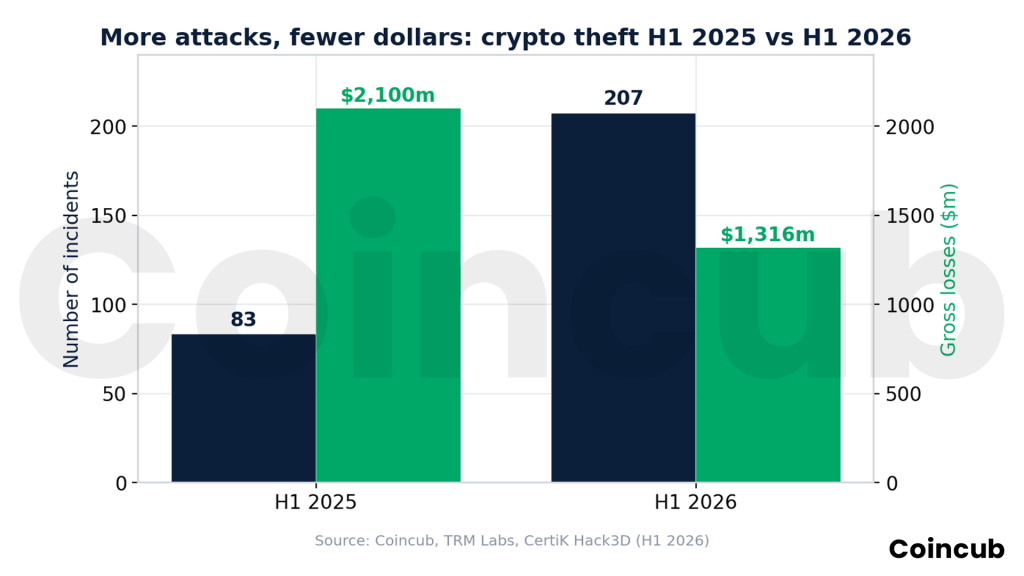
The case for self custody got stronger in 2026, and the reason is the type of attack that now dominates. Thieves are stealing less money through more attacks, and they are doing it by targeting people rather than code. TRM Labs recorded 207 hacks and exploits in the first half of 2026, more than double the 83 seen in the same period a year earlier. Yet the dollars taken fell to roughly $972 million by TRM’s count, while CertiK’s Hack3D report put gross losses at about $1.32 billion once scams and phishing are included.
The single largest event was the Drift Protocol breach, where attackers drained around $295 million. Just three incidents, Drift, Kelp DAO and one targeted phishing victim, made up close to 65 percent of the half year total. Investigators traced roughly $643 million, about two thirds of all losses, to North Korea linked groups such as the Lazarus Group and its TraderTraitor subgroup.
The pattern tells you where the risk sits. Cryptography is rarely broken. Signing interfaces are tricked, approvals are abused, and victims are socially engineered into authorising a transaction themselves. A cold wallet answers that threat directly. It keeps the private key inside a secure chip, forces you to confirm the real transaction details on a trusted screen, and refuses to expose the key even when the connected computer is compromised. In a year defined by manipulation of what signers see, that offline confirmation step is the strongest habit an ordinary holder can build.
Cold Wallets and the 2026 Tax Reporting Rules
Self custody no longer hides you from the tax authorities, and 2026 is the year that became concrete for United States users. Form 1099 DA went live in January 2026, and covered brokers, meaning Coinbase, Kraken, Gemini, Robinhood and other US linked platforms, now report your crypto sales directly to the IRS. For the 2025 tax year filed in 2026, brokers report gross proceeds but are generally not required to report cost basis. That changes with 2026 transactions, when cost basis reporting begins and the first forms carrying basis data arrive in early 2027.
There is a practical trap for cold wallet users. If you move coins from your hardware wallet to an exchange and sell, the exchange may not know what you originally paid and can report a cost basis of zero. That inflates your apparent gain. The fix is record keeping. Log the date, amount and price every time you move crypto onto or off your cold wallet, so you can prove your real basis at filing time. A cold wallet protects your keys, but only your own records protect your tax position.
Top 5 Cold Wallets for 2026
After testing the leading devices on the market, here are the top three recommendations for 2026. These were selected based on security history, ease of use, and build quality.
The Best All-Rounder: Ledger Flex
- Price: ~$250
- Best For: Daily users and DeFi enthusiasts.
In 2026, Ledger released the Flex, a more affordable successor to their premium Stax model. It features a secure E-Ink touchscreen that allows you to read full transaction details clearly before signing.
- Pros: Connects via Bluetooth to your phone (iOS/Android), supports 5,500+ coins, and the “Ledger Live” app is the most user-friendly interface in the industry.
- Cons: Not open-source (you must trust Ledger’s firmware).
The Security Purist’s Choice: Trezor Safe 5
- Price: ~$169
- Best For: Bitcoin maximalists and privacy advocates.
Trezor invented the hardware wallet, and the Safe 5 is their masterpiece. It features a gorilla-glass touchscreen with haptic feedback and runs on fully open-source code. This means security researchers can constantly audit the software for backdoors.
- Pros: No Bluetooth (reduces attack surface), Shamir Backup compatible (allows you to split your seed phrase into multiple shares), and EAL6+ certified security chip.
- Cons: The desktop “Trezor Suite” app is slightly less polished than Ledger’s.
The Best for Beginners: Tangem Wallet
- Price: ~$55 (Pack of 2)
- Best For: First-time buyers who are scared of complex tech.
Tangem disrupted the market by removing the screen and buttons entirely. It looks exactly like a credit card. To use it, you simply tap the card against your phone using NFC (Near Field Communication), just like Apple Pay.
- Pros: Indestructible (waterproof, dustproof), no battery to charge, and incredibly cheap.
- Cons: No screen means you have to trust what your phone displays (slightly lower security than a screen-based device).
The Innovation Pick: Ryder One
- Price: ~$249
- Best For: People who hate writing down “Seed Phrases.”
Ryder is a newer entrant that solves the biggest headache in crypto: managing those 24 random words. Instead of a paper backup, it uses “TapSafe Recovery.” You back up your keys onto physical “Recovery Tags” (essentially backup chips) and trusted social contacts.
- Pros: Sleek, futuristic design (looks like an art piece), completely eliminates “seed phrase anxiety,” and uses an EAL6+ secure chip.
- Cons: High price point for a newer brand; the “seedless” approach scares some old-school security experts (though you can extract the seed if you really want to).
The “Swiss Bank” Choice: BitBox02 (Multi)
- Price: ~$175
- Best For: Users who want open-source security without the complexity.
Made in Switzerland, the BitBox02 is often called the “underdog champion.” It plugs directly into your computer’s USB-C port (no cables needed) and uses invisible touch sensors on the side of the device to control it.
- Pros: Fully open-source firmware, dual-chip security architecture, and a microSD card slot for instant backups (no writing required).
- Cons: The touch sliders can be finicky to learn compared to a traditional touchscreen.
How to Set Up a Cold Wallet?
Buying the device is only step one. How you set it up determines if you are actually secure. Follow this Golden Protocol:
- Buy Directly from the Manufacturer: Never buy a hardware wallet from Amazon, eBay, or a third-party reseller. Sophisticated attackers have been known to intercept packages, modify the device, and reseal it. Always order from the official website of the manufacturer.
- Generate Your Seed Phrase: When you turn the device on, it will generate a Seed Phrase (usually 12 or 24 random words). This is your real money. The device is just a plastic key; the words are the vault.
- The Analog Rule: Write these words down on the provided paper card or a metal backup plate.
- NOTE: Never take a photo of these words. Never save them in a password manager, Google Drive, or Notes app. If these words touch the internet, the chance of your wallet being compromised is extremely high.
- The “5-Dollar Test”: Before you transfer your life savings, send $5 worth of crypto to the new wallet. Then, wipe the device completely. Try to restore your wallet using the words you wrote down. If the $5 reappears, your backup is valid. Now you can transfer the rest.
Common Risks With Cold Wallets & How to Avoid Them
Even with a cold wallet, you are not invincible. In 2026, hackers have shifted from attacking the device to attacking the user.
The “Address Poisoning” Attack
Hackers will send small amounts of dust (e.g., 0.00001 ETH) to your wallet from an address that looks almost identical to yours (e.g., matching the first and last 4 characters). They hope that next time you copy-paste your address from your transaction history, you will accidentally copy their address instead of your own.
- The Fix: Always verify every character of the address on the device screen, not just the first and last few.
Malicious Contracts (Phishing)
A cold wallet cannot protect you if you voluntarily sign a bad contract. If you connect your wallet to a scam website promising a “free airdrop” and click “Approve,” you are giving them permission to drain your funds.
- The Fix: Use a “burner” hot wallet for interacting with new or risky websites. Never connect your cold storage to random dApps.
Physical Threats & Attacks
This is a physical threat. If someone knows you have $1 million in Bitcoin, they can threaten you until you unlock it.
- The Fix: Use a device that supports a “Passphrase” (or Hidden Wallet). This creates a hidden account behind a fake PIN. If attacked, you give the thief the PIN to a “dummy” wallet with only $500 in it, while your real wealth remains hidden on the same device.
Final Thoughts on Crypto Cold Wallets
In the fast-paced, high-risk world of cryptocurrency, a cold wallet is the only true insurance policy. It separates your financial destiny from the failures of centralized institutions.
Cold storage in 2026 is less about surviving a dramatic exchange collapse and more about defeating the slow, human focused attacks that now define crypto theft. Buy a current device, verify every address on its screen, keep your seed phrase offline, and document your transfers for the taxman. The tools have improved, and so have the scams, which is exactly why the offline vault still wins.
Frequently Asked Questions (FAQs)
Can a cold wallet be hacked?
The device itself is virtually unhackable remotely. However, you can be tricked into signing a malicious transaction, or your seed phrase can be stolen if you store it digitally.
What happens if I lose my cold wallet?
Nothing bad happens to your funds immediately. You simply buy a new device and enter your 24-word seed phrase to restore access. Your money is on the blockchain, not inside the plastic device.
Do I need a cold wallet for Altcoins?
Yes. Most modern cold wallets (Ledger, Trezor, Tangem) support thousands of different coins, including Ethereum, Solana, and memecoins.
What is a cold wallet for crypto?
A crypto cold wallet is a physical device or offline storage method that keeps your cryptocurrency private keys completely disconnected from the internet. Unlike hot wallets, cold wallets use an “air gap” to prevent remote hacking, making them the safest option for securing long-term digital assets against online theft.
What is the best cold wallet for crypto?
In 2026, the Ledger Flex is the top choice for usability, while the Trezor Safe 5 is preferred by security experts for its open-source code. Beginners often choose Tangem for its card-shaped simplicity, whereas Ryder One offers an innovative “seedless” recovery system for those avoiding complex backups.
Can you lose crypto from a cold wallet?
Yes, but typically due to human error rather than hacking. You can lose funds if you physically lose your device and your backup seed phrase. Additionally, users can still lose crypto if they are tricked into signing a malicious smart contract (phishing) or if they store their seed phrase digitally.
Are cold wallets 100% safe?
No security method is 100% foolproof. While cold wallets are immune to computer viruses and remote hacks, they are still vulnerable to physical theft, supply chain attacks, and user mistakes. However, they remain exponentially safer than keeping funds on a centralized exchange or an internet-connected hot wallet.
Can the IRS see your crypto wallet?
Yes. While the IRS cannot directly “see” inside a cold wallet, they track transfers from “Know Your Customer” (KYC) exchanges to your offline address using blockchain analytics. Starting in 2026, exchanges must file Form 1099-DA, reporting your transaction history and wallet connection data directly to the IRS.