


 Buy a Licensed Company
  Explore VASP Data
  Talk to an Expert

 Atis Shala
Atis is a senior analyst and community lead with four years of experience in crypto. He has a bachelor from the Rochester Institute of Technology.
Atis Shala
Atis is a senior analyst and community lead with four years of experience in crypto. He has a bachelor from the Rochester Institute of Technology.
Mining Software Showdown: GMiner vs. NiceHash
The era of “turn it on and forget it” Ethereum mining is over, but the GPU mining landscape remains active for those willing to adapt. In 2026, profitability depends not just on hardware, but on the efficiency of the software driving it. The choice between a dedicated miner like GMiner and a hashrate marketplace like NiceHash often defines a user’s entire strategy: direct asset accumulation versus simplified Bitcoin payments.
Mining software serves as the bridge between your hardware and the blockchain network. The wrong choice can lead to wasted electricity, lower hashrates, or unnecessary fees eating into thin margins. Stability matters even more; a rig that crashes overnight generates zero revenue until you wake up to fix it.
This article compares two heavyweights representing opposing philosophies. GMiner stands as a pinnacle of manual control and raw performance for specific algorithms. NiceHash represents the ultimate convenience, automating the complex decisions of what to mine and where to sell the hashrate. We will dissect their features, fees, and workflows to determine which tool aligns with your mining goals.

Understanding Crypto Mining Software
Mining software performs complex mathematical calculations to secure a blockchain network. It translates these calculations into “shares” that a mining pool accepts as valid work. Without this software, your powerful GPU is just a graphics processor waiting for a gaming workload.
To understand the comparison, we must distinguish between the miner, the pool, and the marketplace.
- The Miner (e.g., GMiner): A standalone executable that commands the GPU to solve algorithms. It connects directly to a pool.
- The Pool: A collective of miners who combine their hashrate to find blocks more frequently and split the rewards.
- The Marketplace (e.g., NiceHash): A platform where you sell your hashrate to the highest bidder. You do not technically “mine” a specific coin for yourself; you rent out your hardware’s power.
Automation and monitoring play critical roles here. Advanced setups use software watchdogs to restart crashed drivers automatically. GMiner requires you to configure these parameters manually, while NiceHash handles them in the background.
What Is GMiner?
GMiner is a high-performance, command-line mining software originally developed for Nvidia GPUs, though it now supports AMD hardware effectively. Developers designed it with a focus on stability and specialized algorithms. Unlike user-friendly GUI applications, GMiner operates as a binary file that users launch via batch (.bat) scripts or shell scripts.
It thrives in the “altcoin” mining sector. As new Proof-of-Work (PoW) coins emerge, such as those using KHeavyHash (Kaspa) or PyrinHash, GMiner often releases optimized kernels faster than competitors. It runs on both Windows and Linux, making it a staple for dedicated mining operating systems like HiveOS or RaveOS.
Key Features of GMiner
- Algorithm Support: GMiner supports a vast array of algorithms including KawPow (Ravencoin), Autolykos2 (Ergo), CuckooCycle, and various Equihash iterations. It excels at dual-mining (mining two coins simultaneously) without significant hashrate loss on the primary coin.
- GPU Optimization: The software interacts directly with the GPU kernel. It allows for precise tuning of memory clocks, core clocks, and power limits via command-line arguments.
- Pool and Wallet Configuration: Users retain total control. You define exactly which pool to join and which wallet address receives the funds.
- Command-line vs. OS Integrations: While it lacks a native graphical interface, it integrates seamlessly into mining management dashboards. This makes it ideal for remote farm management where visual interfaces are unnecessary.
Solo miners use GMiner to hunt for blocks on low-difficulty coins, hoping for a full block reward. Professional farms deploy GMiner across thousands of GPUs using HiveOS to squeeze out every last hash of performance. It serves users who want to accumulate specific project tokens directly, betting on the future value of that asset rather than immediate Bitcoin conversion.
What Is NiceHash?
NiceHash is not a traditional mining pool; it is a hashrate broker. When you run NiceHash, you are the seller. Buyers on the other side place orders for massive amounts of hashrate to mine specific coins. NiceHash directs your hardware to fulfill these orders and pays you in Bitcoin (BTC).
The ecosystem splits into two main software offerings:
- NiceHash Miner: A “wrapper” that downloads various third-party plugins (like GMiner, NBMiner, or Excavator) and automatically switches to the most profitable one.
- NiceHash QuickMiner: A lightweight, in-house solution (digitally signed by NiceHash) that runs only their proprietary “Excavator” miner. It prioritizes safety and ease of use over broad algorithm support.
Key Features of NiceHash
- Hashrate Marketplace Model: You essentially work as a mercenary. You might be hashing KawPow one minute and Autolykos the next, depending on what buyers demand. You get paid for the work, not the block reward.
- Automatic Algorithm Switching: The software benchmarks your hardware against various algorithms. If the market shifts and one coin becomes more profitable, NiceHash re-tasks your GPU instantly.
- Payout Structure: Users receive payments in Bitcoin, regardless of what algorithm the GPU is actually crunching. This simplifies tax reporting and accumulation strategies for Bitcoin maximalists.
- Built-in Monitoring: The web dashboard and mobile app provide real-time stats, rig temperature monitoring, and remote stop/start functionality without complex network configuration.
Typical NiceHash Use Cases
Beginners flock to NiceHash because it removes the barrier to entry. You download, click “Start,” and earn Bitcoin. Casual miners with gaming PCs use it to offset hardware costs when not playing. It also suits multi-purpose PCs where the user wants to run a miner in the background without dedicating the machine to a Linux-based mining OS.
Mining Workflow Comparison
How mining starts with GMiner
The process begins with downloading the binary archive. You must exclude the folder from Windows Defender, as antivirus software often flags miners as false positives. Next, you locate a .bat file (e.g., mine_kaspa.bat), right-click to edit it, and paste your wallet address and pool server URL. You then save the file and double-click it to launch a command prompt window. You watch scrolling text to confirm “Share Accepted.”
How mining starts with NiceHash
You create an account on the NiceHash website. You download the installer (QuickMiner or NiceHash Miner) and run it. The software detects your GPU and runs a benchmark to test speeds. You enter your BTC wallet address (or use the internal NiceHash wallet) and press a large “Start” button. The GUI displays your daily estimated earnings in your local currency immediately.
GMiner requires you to research pools, find stratum addresses, and manage exchange wallets for every coin you mine. NiceHash centralizes this. You manage one account and one Bitcoin address.
With GMiner, you mine to a pool. Pools have minimum payout thresholds (e.g., 100 KAS or 10 ERG). You might mine for weeks before seeing a deposit. NiceHash pays out every 4 hours if you meet a very low threshold (0.00001 BTC), providing almost immediate liquidity.
Key Differences at a Glance
| Feature | GMiner | NiceHash |
| Mining Model | Direct coin mining (Self-custody) | Hashrate marketplace (Rent-out) |
| Ease of Setup | Moderate to advanced | Beginner-friendly |
| Control Level | High (Pools, Wallets, Clocks) | Low to medium |
| Algorithm Selection | Manual (User decides) | Automatic (Profitability decides) |
| Payout Currency | The specific mined coin | Bitcoin (BTC) |
| Fee Structure | Developer fee (0.65%–2%) + Pool fee | Service fee (2%) + Withdrawal fee |
| Hardware Support | AMD & NVIDIA | Primarily NVIDIA (QuickMiner) |
| Best For | Advanced miners, Speculators | Beginners, Bitcoin stackers |
Performance and Optimization
GMiner is a tool for the obsessionist. It allows for “dual mining” configurations where you tune the intensity of the secondary coin to ensure the primary coin’s hashrate remains stable. Experienced users can pass specific arguments to lock core clocks and memory voltages, reducing power consumption significantly while maintaining high hash rates. This manual tuning usually results in higher raw efficiency than auto-tuners.
NiceHash QuickMiner counters this with its “OCTune” tool. It attempts to auto-optimize your card for efficiency (High, Medium, Lite profiles). While convenient, these profiles are generic. A “Medium” profile on one RTX 4070 might be stable, while on another it causes crashes due to silicon lottery variance. Furthermore, the constant algorithm switching in NiceHash Miner creates downtime. Every time the software switches from KHeavyHash to KawPow, the DAG file must reload, and the GPU idles for 30-60 seconds. In a volatile market, frequent switching kills average profitability.
Fees, Costs, and Profitability
GMiner charges a “developer fee.” The software mines for the developer for a short period every hour.
- Standard algorithms (e.g., Ethash/Etchash): Typically 0.65%.
- Specialized/Newer algorithms: Can range from 1% to 2%.
- Plus: You pay a pool fee (usually 1%) to the mining pool you choose.
- Total friction: ~1.65% to 3%.
NiceHash, on the other hand, does not charge a developer fee on their QuickMiner (Excavator), but they charge a service fee on your earnings.
- Service Fee: NiceHash takes 2% of your total earnings before they hit your internal wallet.
- Withdrawal Fee: Moving BTC from NiceHash to a cold wallet incurs a network fee and potentially a platform withdrawal fee depending on the amount.
- The “Marketplace Spread”: Buyers on NiceHash pay a premium, but they also want a profit. Sometimes the “pay rate” for hashrate is lower than what you would earn by directly mining the coin and selling it yourself.
If you mine a small-cap coin with GMiner and hold it, and that coin does a 10x in price, your profitability skyrockets. With NiceHash, you are paid in BTC at the current moment. You lose the potential upside (and downside risk) of holding speculative altcoins.
Security and Trust Considerations
GMiner is closed-source. You trust the developer not to include malicious code. However, it has a long reputation in the community. NiceHash QuickMiner’s core (Excavator) is signed by a registered company, offering a higher perceived trust level for corporate environments.
NiceHash is a custodial service initially. Your earnings sit in their wallet until you withdraw. History reminds us that NiceHash suffered a massive hack in 2017 (though they reimbursed users). Using GMiner allows for self-custody from day one; the pool sends coins directly to your personal Ledger or Trezor address.
The safest approach with GMiner is using a dedicated mining VLAN to isolate the rig from your personal data. With NiceHash, the risk is account compromise; users must enable 2FA to prevent unauthorized withdrawals of their accumulated Bitcoin.
10. Pros and Cons Summary
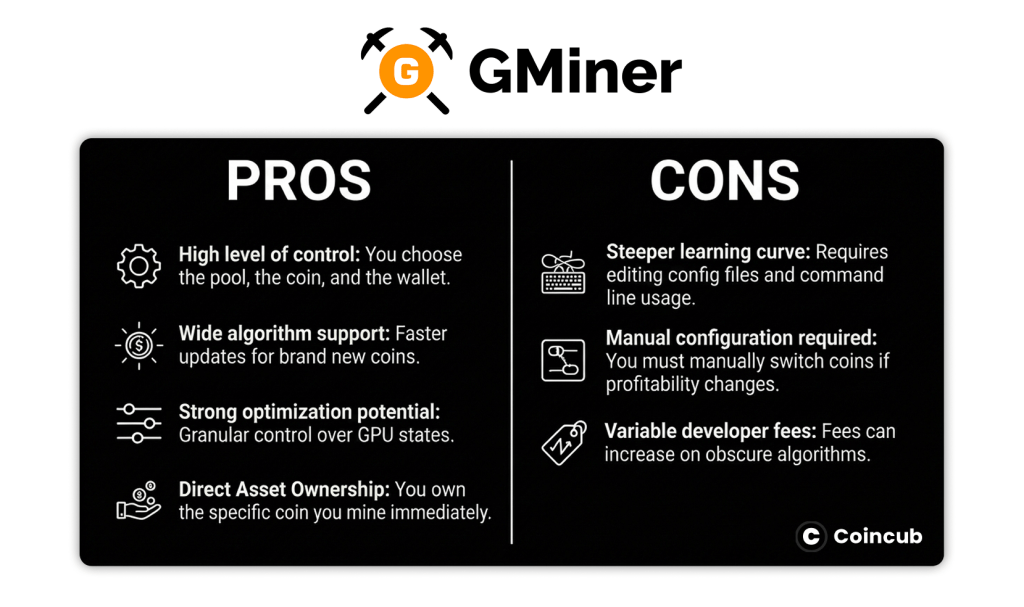
GMiner Pros & Cons
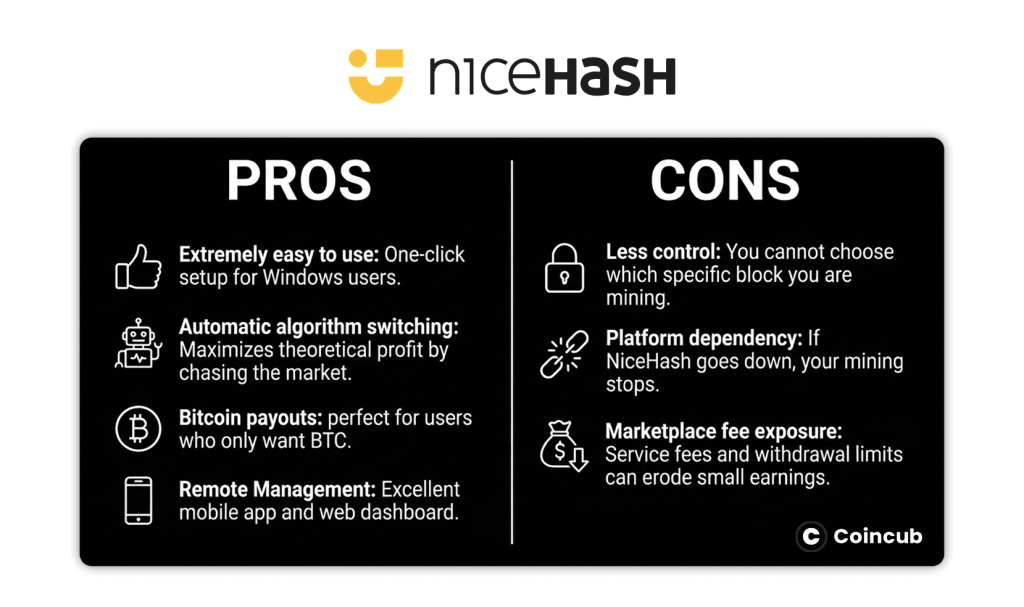
NiceHash Pros & Cons
Which One Should You Choose?
Your decision depends on your technical comfort and your investment thesis.
If you are a beginner / gamer:
Use NiceHash. You likely have a single gaming PC and don’t want to manage exchange accounts for obscure altcoins. You just want a few dollars in Bitcoin to offset your Steam purchases. The 2% fee is worth the time you save not configuring batch files.
If you are a speculator:
Use GMiner. You believe a new coin (e.g., Pyrin or a new Kaspa fork) will skyrocket in value. NiceHash would sell that hashrate immediately for BTC. GMiner allows you to mine the asset directly, stack thousands of coins, and hold them for a potential bull run.
If you are experienced and a dedicated rig owner:
Use GMiner (via a Mining OS). If you run a 6-GPU rig, Windows is often unstable. Running GMiner on a Linux-based OS like HiveOS offers superior stability. You can still point GMiner to a NiceHash stratum address if you want BTC payments, giving you the best of both worlds (GMiner stability + NiceHash payment).
If you own a mining farm:
Use GMiner. At scale, the 2% NiceHash fee adds up to significant lost revenue. You have the resources to build automated scripts to switch algorithms based on market data, bypassing the middleman fee.
Final Thoughts: GMiner vs. NiceHash
GMiner and NiceHash serve different masters. GMiner is the tool for the artisan, the miner who treats operations as a business, demanding control over every clock cycle and every fraction of a coin. It rewards knowledge with efficiency and direct asset ownership.
NiceHash is the tool for the pragmatist. It treats mining as a utility, converting electricity directly into Bitcoin with minimal friction. It strips away the complexity of wallets, exchanges, and pools, delivering a polished, user-friendly experience at the cost of slightly higher fees.
If your goal is to learn how crypto works and bet on specific projects, download GMiner. If your goal is simply to accumulate Bitcoin with zero headache, NiceHash remains the undisputed king of convenience.
Frequently Asked Questions (FAQs)
What is mining software?
Mining software is a computer program that connects your hardware to a blockchain to solve cryptographic puzzles. It manages the hashing process, secures the network, and facilitates the distribution of cryptocurrency rewards. Key functions include hardware monitoring, pool connection management, and hashrate optimization for GPUs and ASICs.
What is the best mining software?
Mining software is a computer program that connects your hardware to a blockchain to solve cryptographic puzzles. It manages the hashing process, secures the network, and facilitates the distribution of cryptocurrency rewards. Key functions include hardware monitoring, pool connection management, and hashrate optimization for GPUs and ASICs.
What does data mining software do?
Data mining software extracts hidden patterns and insights from large datasets using statistical algorithms and machine learning. Unlike cryptocurrency mining, which generates tokens, data mining focuses on predictive modeling and business intelligence. It is used in industries like finance and healthcare for fraud detection and trend analysis.
What is a Gminer?
GMiner is a high-performance multi-algorithm cryptocurrency miner optimized for NVIDIA and AMD GPUs. It supports popular algorithms like KAWPOW, Octopus, and Autolykos. Known for its stability and low power consumption, it features a built-in statistics server and charges developer fees ranging from 0.65% to 3%.
Does NiceHash really pay?
Yes, NiceHash is a legitimate marketplace that pays users in Bitcoin for selling their computing power (hashrate). Buyers pay for the power to mine specific coins, and NiceHash distributes those payments to sellers. Payouts occur every four hours once you reach the minimum threshold of 0.00001 BTC.
Is NiceHash free to mine?
NiceHash is free to download, but using the service incurs costs. Sellers pay a 2% fee on earnings deposited into their NiceHash wallet. Additionally, while Lightning Network withdrawals are free, standard blockchain withdrawals to external wallets involve dynamic fees based on network conditions and a minimum amount.