


 Buy a licensed company
  VASPs live data and insights
  Learn about crypto safety
  Read the latest research

 Atis Shala
Atis is a senior analyst and community lead with four years of experience in crypto. He has a bachelor from the Rochester Institute of Technology.
Atis Shala
Atis is a senior analyst and community lead with four years of experience in crypto. He has a bachelor from the Rochester Institute of Technology.
Build Your First Mining Rig: Step-by-Step Home Guide
Crypto mining is a hot topic for home builders who enjoy hands-on projects and want to profit from blockchain technology passively. The idea of running a machine that helps secure a decentralized network captures both curiosity and ambition. Many newcomers start with a simple question: can a custom rig at home generate consistent rewards while teaching valuable technical skills? The answer depends on how you prepare, how you manage costs, and how well you understand the process behind mining.
The landscape has shifted over the years. Industrial farms now dominate most proof of work networks, yet home rigs still hold a place for hobbyists who value control, transparency, and independence. A well designed setup can operate efficiently when paired with responsible power management and realistic expectations. Instead of chasing fast profits, successful builders treat mining as a structured project that blends hardware knowledge with financial discipline.
The decision to build your own rig becomes easier once the big picture settles. Clear knowledge of mining mechanics and hardware roles removes most early uncertainty. Careful part selection shapes a stable foundation while thoughtful assembly prevents costly mistakes. With steady power, controlled temperatures, and a balanced configuration, a home rig can run with purpose and provide you steady returns if mining through a pool.
How Does Crypto Mining Work?
Mining acts as the engine that keeps a proof of work blockchains alive. Every block requires computational effort, and miners supply that effort through specialized hardware that solves mathematical puzzles. These puzzles are not random tasks. They serve as a security mechanism that prevents anyone from rewriting the chain or submitting fraudulent transactions. When your machine finds a valid solution and consensus is reached between the majority of rigs, the network accepts the block and issues a reward.
This process follows a straightforward cycle. Your mining software receives transaction data, packages it, and attempts to produce a valid hash. The hash must meet the network’s difficulty target, which adjusts over time to control how quickly new blocks are created. Rising difficulty signals heavier competition since more miners are entering the network. Falling difficulty indicates the opposite. Your hash rate defines how many attempts your rig can make each second, which determines your share of potential rewards.
Mining pools play a major role because they combine the hash power of many individuals. Solo mining rarely produces steady outcomes for beginners due to high difficulty on most major networks. Pool participation spreads rewards across contributors in smaller but consistent increments. Your hardware receives tasks from the pool, works on them, then reports solutions back.
Proof of work differs from proof of stake, which relies on locked tokens instead of computation. PoW demands physical resources that include electricity, heat tolerance, and hardware lifespan. This cost creates the security barrier that keeps attackers from overpowering the network. When you run a mining rig at home, you participate directly in that defensive layer. The output of your system becomes part of a global effort to validate data, maintain the ledger, and support the integrity of the chain.
What Do You Need to Build Your First Mining Rig
A home mining project works best when you create the right conditions before you buy a single part. The first step involves setting a clear budget. Mining hardware varies widely in cost, and the most powerful GPUs demand higher upfront investment. A realistic budget keeps the build focused and prevents you from overspending on components that will not meaningfully improve your hash rate. It also prepares you for ongoing electricity costs, which form the largest long term expense.
Power availability shapes the entire setup. Mining rigs draw steady wattage for hours without breaks, so your home circuit must handle continuous load. A single rig often consumes between 800 and 1500 watts, depending on your GPU choice and tuning strategy. Safe operation requires dedicated circuits, reliable outlets, and quality cabling. Overloaded wiring creates unnecessary risk. Before you power on any hardware, confirm that your electrical layout supports long term use.
Heat and noise present the next challenge. GPUs produce high temperatures, and fans work aggressively to keep them under control. A cramped or poorly ventilated room traps heat, which forces components to throttle or shut down. Choose a space with solid airflow where you can position the rig on a sturdy surface with open clearance. Expect constant fan noise, especially during heavy loads. Some builders pick garages, basements, or separate utility areas to maintain comfort inside the living space.
Safety matters throughout the preparation phase. Reliable power strips, surge protectors, and proper grounding create stability. Dust management helps prevent fan failure and overheating. Even small steps, such as keeping cables organized and ensuring that nothing blocks ventilation, protect your hardware from avoidable damage.
Essential Mining Rig Components
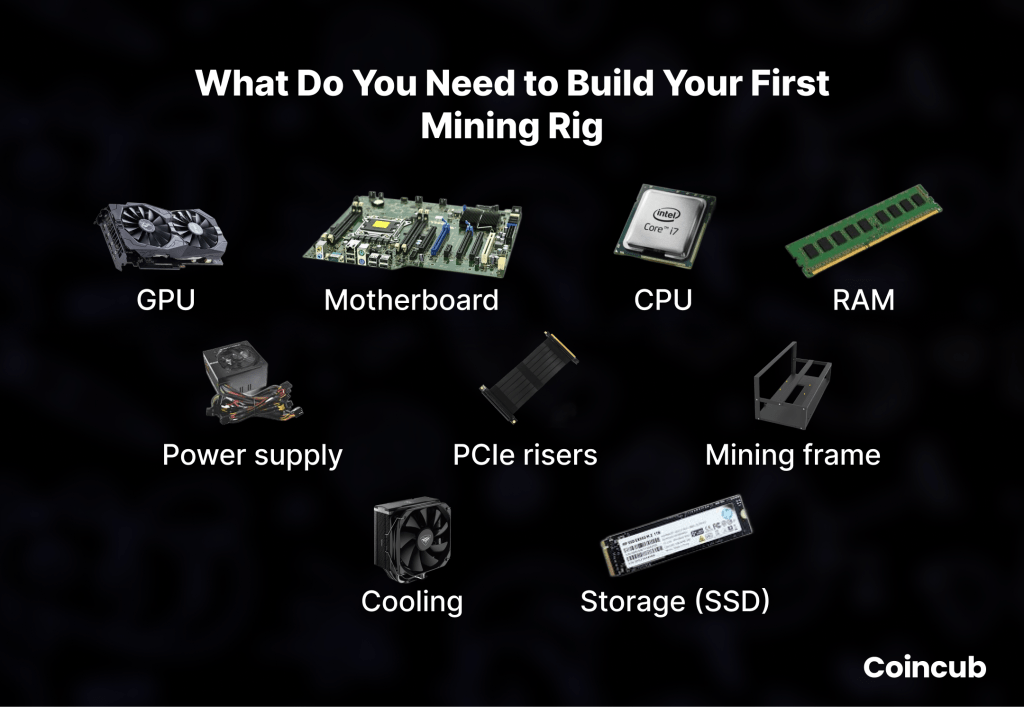
A mining rig operates like a small computing cluster where each component plays a direct role in performance, stability, and efficiency. The essential mining rig components are: GPUs, motherboard, CPU, RAM, power supplies, risers, frames, storage, cooling and airflow.

GPUs for Home Mining Rig
GPUs deliver the raw computing power that drives your hash rate. Their architecture allows them to perform parallel calculations at high speed, which fits the demands of proof of work mining. Higher end cards often produce better performance, although efficiency matters just as much as output. A powerful GPU running at poor efficiency can raise electricity bills without delivering proportional rewards. Balance your choices by reviewing hash rates, watt consumption, and thermal profiles. Compatibility with your mining software also plays a role.
Motherboard for Home Mining Rig
The motherboard functions as the central hub that connects every part of the rig. Mining friendly boards offer multiple PCIe slots to support several GPUs at once. Stability is the priority because a misconfigured or low quality board can cause random shutdowns or failed GPU detection. Look for motherboards with enough PCIe lanes, clear spacing for risers, and BIOS options that support mining modes. This foundation determines how many GPUs you can scale into the system.
CPU for Home Mining Rig
Mining rigs do not require powerful CPUs unless you plan to run additional services. A basic, energy efficient processor is usually enough to boot the system, manage the operating environment, and support mining software. Choose a processor that fits the motherboard socket and consumes low wattage. This approach reduces heat and keeps operating costs under control.
RAM for Home Mining Rig
Most mining setups run smoothly with modest RAM. The system only needs enough memory to handle the operating system and mining software. Eight gigabytes usually covers all tasks. Additional RAM rarely improves performance unless you pair mining with other workloads.
Power Supplies for Home Mining Rig
Power supplies feed stable electricity to the entire rig. Clean power delivery prevents crashes and protects hardware from voltage spikes. Mining builds often require more than one PSU because GPUs draw significant power. Choose high efficiency units with reliable ratings such as 80 Plus Gold or Platinum. Consistent load handling extends the lifespan of both the PSU and connected components.
Risers for Home Mining Rig
PCIe risers allow GPUs to run away from the motherboard while remaining fully connected. They create physical spacing that helps with cooling and cable organization. Quality risers reduce instability caused by poor data transfer or weak power connections. Secure them properly to avoid strain on cables and connectors.
Frame for Home Mining Rig
The frame supports your hardware and shapes the airflow pattern. Open air frames help heat escape and give easy access for cleaning. A sturdy frame keeps components in place while reducing vibration. Good spacing between GPUs improves cooling efficiency and eases maintenance.
Storage for Home Mining Rig
Mining software and the operating system need only a small drive. Solid state storage boots quickly and handles updates with reliability. A compact SSD keeps the build neat and reduces failure risks compared to mechanical drives.
Cooling and Airflow for Home Mining Rig
Cooling determines whether your rig runs at peak performance or struggles with thermal throttling. Strong airflow carries heat away from GPUs and power supplies. Use high quality fans that push air in a clear direction, and keep the rig free of dust. Balanced intake and exhaust patterns prevent hotspots and help your system maintain stable hash rates.
How to Build a Mining Rig?
A well assembled mining rig performs consistently and avoids the most common hardware failures. Careful preparation and steady progress through each step create a stable foundation. The following instructions walk you through the full build from an empty frame to a system ready for mining software.
1. Organize All Mining Rig Components
Start by placing every part on a clean, static free surface. Verify that each item arrived without damage. Check GPU fans for smooth rotation. Inspect power supplies for intact connectors. Confirm that your risers match the number of GPUs. Organize screws, standoffs, and cables so you can reach them easily during the build. This early step reduces errors and prevents unnecessary disassembly later.
2. Mount Motherboard and CPU
Secure the motherboard onto the frame using the correct standoffs. Firm mounting prevents flexing when you attach cables. Install the CPU by aligning the processor’s notches with the socket keys. Place it gently, then lock the socket arm. Apply a thin, even layer of thermal paste if the cooler requires it. Attach the CPU cooler and plug its fan cable into the motherboard header. This connection ensures that the system monitors CPU temperatures correctly.
3. Install RAM and Storage
Insert RAM sticks into the recommended slots, usually the first and third slots for dual channel configurations. Press firmly until both latches click into place. Mount your SSD to the frame or motherboard, depending on the design. Connect it using a SATA cable if required, or secure it directly into an M.2 slot. This gives the operating system a fast and reliable boot device.
4. Position the Power Supplies and Connect Cables
Place the power supplies in a location that allows clear airflow and easy cable routing. Many open air frames provide designated PSU brackets. Secure the units so they stay stable during operation. Connect the 24 pin cable to the motherboard and attach the CPU power cable. Prepare PCIe cables for GPUs but avoid connecting them to the cards yet. If you use two power supplies, link them with a PSU sync cable so both units start at the same time.
5. Install GPUs and Risers
Attach each riser to a stable surface on the frame. Plug the small x1 connector into the motherboard PCIe slot. Connect the USB cable from the riser to the x1 board. Mount the GPUs onto the risers and secure them with screws or brackets. Connect PCIe power cables to each GPU, making sure not to overload any single rail on the power supply. Stable power distribution prevents crashes under load.
6. Connect Fans and Manage Airflow
Position intake and exhaust fans so air moves across the GPUs in a single direction. Front to back or bottom to top patterns work well. Connect fans to a hub or directly to the motherboard, depending on your layout. Keep cables neat to avoid airflow obstruction. Proper airflow keeps temperatures stable and reduces fan noise during extended mining sessions.
7. Complete System Wiring
Review each connection. Confirm that the motherboard receives CPU and 24 pin power. Check that each riser receives both data and power. Ensure GPUs have enough PCIe connectors and that cables rest without tension. Bundle loose wires with ties to prevent accidental disconnections. A tidy system simplifies troubleshooting and improves safety.
8. First Boot and BIOS Adjustments
Connect a monitor and keyboard. Power on the rig and enter the BIOS. Set the motherboard to mining friendly settings. Enable Above 4G Decoding, set PCIe link speed to Gen 2 for improved stability, and confirm that all GPUs register correctly. Adjust fan profiles if your motherboard supports it. Save your settings and reboot. Once the system loads into the operating environment, you can prepare it for mining software.

How to Install Mining Software and Connect to a Pool?
Mining software links your hardware to the blockchain network and translates GPU power into measurable hash rate. Several beginner friendly programs provide stable performance and straightforward setup. Popular options include T-Rex Miner for NVIDIA GPUs, TeamRedMiner for AMD cards, and lolMiner for mixed hardware. These miners have active development, clear documentation, and consistent optimization. Their official releases come directly from GitHub, which ensures safe downloads and avoids tampered files.
Configuring a wallet comes next because mining rewards must flow to an address you control. Every coin uses its own wallet format, so choose an official or well established wallet for the specific network you plan to mine. For example, the Bitcoin Core wallet comes from Bitcoin.org, while Ethereum Classic users often choose Emerald Wallet or Trust Wallet. After installation, copy your public address and store your recovery phrase in a secure offline location. Never share private keys or seed phrases. Your miner will only need the public address, which identifies where rewards should be sent.
Joining a mining pool provides consistent payouts and reduces the uncertainty that comes with solo mining. Large, reputable pools such as F2Pool, ViaBTC, and Hiveon Pool publish clear payout rules and transparent fee structures. Create an account if required, select your coin, and review the pool’s recommended miner settings. Most pools provide a connection string that includes the server address and port number. You will paste that information into your miner configuration along with your wallet address and a worker name to identify your rig.
Fine Tuning Hash Rate at Home
Once the miner runs, you can fine tune hash rate through safe adjustments. Undervolting lowers power consumption without harming performance, while moderate overclocking enhances hash output. Every GPU model responds differently, so begin with conservative settings. Monitor stability, temperatures, and accepted shares. Miners reject unstable configurations quickly, so watch for invalid share rates and adjust clocks if needed. GPU temperatures should remain well below thermal limits published by the manufacturer. Consistent cooling protects long term efficiency.
How to Maximize Mining Rig Profits?
You can maximize mining rig profits through proper optimization, ongoing maintenance, and cost management. However, keep in mind that mining crypto does not always provide consistent rewards and depends on how many blocks the pool your participate in mined throughout the day, how many miners dedicate their computing power to that pool, and multiple other factors.
Performance Optimization and Troubleshooting
Performance tuning begins with controlled overclocking. Increase core and memory clocks in small increments while watching stability and share acceptance. Most mining algorithms benefit more from memory speed than core frequency, so prioritize memory adjustments. Test each step until the rig produces a steady hash rate without invalid shares or crashes.
Undervolting reduces power draw while keeping the GPU within its optimal efficiency range. Lower voltage settings cut electricity costs and heat output. Each GPU model responds differently, so move slowly and validate stability after every change. A balanced combination of higher memory clocks and lower voltage often delivers the best long term performance.
Common errors appear during early tuning. Invalid shares usually indicate unstable clocks. Driver failures often point to excessive overclocking or poor riser connections. Random shutdowns may signal overloaded power supplies or faulty cables. Address these problems by reverting settings, reseating hardware, or distributing power more evenly.
Temperature management shapes the lifespan of your components. Keep GPUs well below their thermal limits by improving airflow, cleaning dust, and adjusting fan curves. Stable temperatures protect performance and reduce the risk of throttling or hardware degradation. Careful tuning turns a basic rig into a reliable one.
Ongoing Maintenance and Cost Management
Long term performance also depends on steady upkeep, and the habits you build during optimization carry naturally into routine maintenance. Clean your hardware regularly to prevent dust buildup that restricts airflow. Fan blades, heatsinks, and risers collect debris over time, which raises temperatures and reduces efficiency. A quick inspection every few weeks keeps the system stable and extends component lifespan. Hardware monitoring tools help track temperature, fan speed, and hash rate so you can spot issues before they turn into downtime.
Electricity costs shape the economics of home mining, so keep a close eye on power consumption. Smart plugs, watt meters, or utility dashboards reveal real time usage. These readings help you calculate daily and monthly expenses with accuracy. Small adjustments to undervolting or fan curves can trim consumption without lowering hash rate.
Profitability tools complete the picture by comparing your power costs to expected mining revenue. Platforms such as WhatToMine and CoinWarz list current network difficulty, block rewards, and market prices. By checking these metrics regularly, you can make informed decisions about which coin to mine and when to adjust your configuration. Consistent maintenance and cost awareness keep your rig profitable, stable, and predictable.
The Price of Building Your First Mining Rig
The price of a full home mining rig varies widely, with GPUs making up most of the budget. A typical starter build with four to six mid range GPUs usually costs between $1,500 and $4,000, while more powerful or larger GPU setups can reach $5,000 to $8,000 or more. Supporting components such as a mining friendly motherboard, basic CPU, 8 GB RAM, SSD, risers, frame, and one or two efficient power supplies usually add $250 to $500. Mining software, official wallets, and mining pool access are free, while electricity remains the largest ongoing cost and strongly affects profitability.
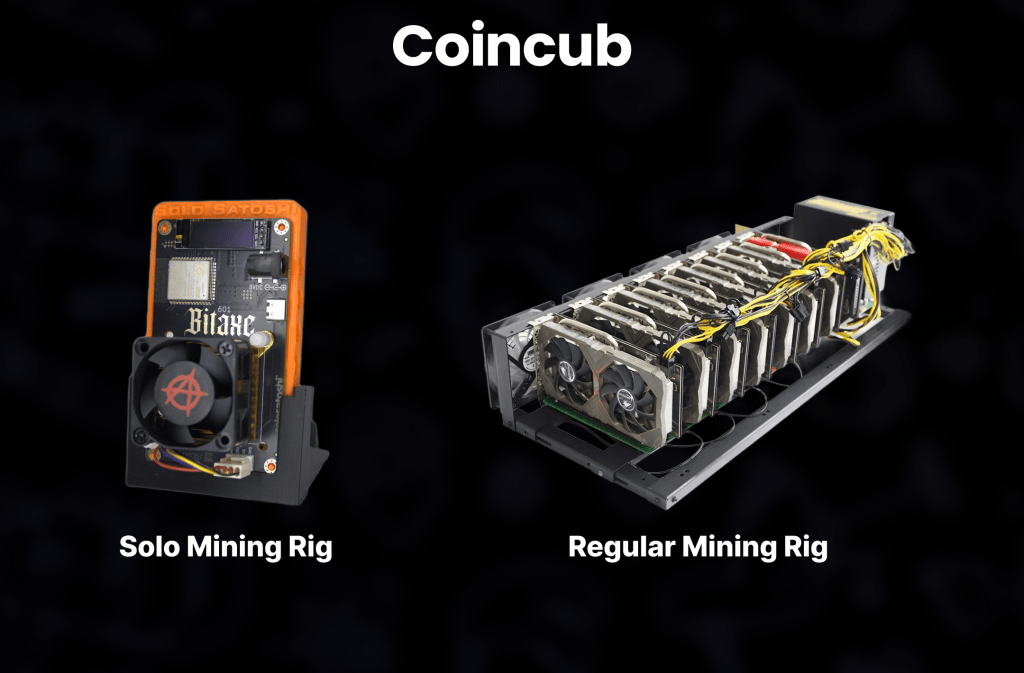
Then you have the solo mining rigs, the ones that are not used to join pools but rather mine a specific cryptocurrency individually. They are often found at a price range between $50-$200. However, this type of miners is not used for consistent profit. Solo miners either hit a full block and reap massive rewards, or they don’t mine anything. So, a lottery ticket if you will.
Frequently Asked Questions (FAQ)
What is a mining rig?
A mining rig is a computer built to solve proof of work algorithms and earn crypto rewards. It uses multiple GPUs, specialized software, and continuous electricity to contribute hash power to a blockchain network. The rig submits valid solutions that help secure the chain and generate payouts.
Is a mining rig profitable?
A mining rig can be profitable when electricity costs are low, hash rate is strong, and market conditions remain favorable. Profitability varies daily because rewards depend on network difficulty, pool performance, and coin prices. Efficient GPUs and tuned power settings increase the odds of earning consistent returns.
How does a mining rig make money?
A mining rig makes money by solving valid blocks or shares that contribute to block creation. Mining pools distribute rewards based on each miner’s contribution. When your rig submits accepted shares, you receive a portion of the block reward, usually paid out daily or after reaching a minimum threshold.
Can I mine 1 Bitcoin a day?
No, a single home mining rig cannot mine 1 Bitcoin per day. Bitcoin mining difficulty is extremely high, and only large industrial farms with massive ASIC infrastructure can achieve significant output. A GPU rig cannot mine Bitcoin directly because modern Bitcoin mining requires ASIC hardware.
How long does it take 1 miner to mine 1 Bitcoin?
A single ASIC miner would take many years to mine 1 Bitcoin on its own, and a GPU rig cannot mine Bitcoin at all. The exact timeline depends on the miner’s hash rate and global competition. Most miners rely on pools because solo mining is statistically unrealistic.
How to start a mining rig?
You can start a mining rig by assembling required components, installing mining software, configuring a wallet, and joining a mining pool. Once the system boots, tune your GPUs with safe overclock and undervolt settings to stabilize hash rate. Monitor temperatures and power use to maintain efficiency.