Buy a Licensed Company
  Explore VASP Data
  Talk to an Expert
 Buy a registered Canadian MSB
All-in-one mobile and browser wallet delivering broad asset coverage and Web3 access.
| Founded | 2017 |
| Headquarters | USA |
| Wallet Type | Hot Wallet |
| Models Available | Mobile app (iOS, Android), Browser extension (Chrome, Brave, Opera, Edge) |
| Chains Supported | 100+ blockchains including Bitcoin, Ethereum, BNB Chain, Solana, and more |
| Connectivity | Internet-connected via mobile app and browser |
| Backup & Recovery | BIP39 12-word seed phrase |
| Companion App | N/A (Mobile app is the wallet) |
| Customer Support | Community forums, email support, ticket system; no phone support |
| Deposit/Receive Methods | On-chain crypto transfers; fiat purchases via third parties |
| Price & Fees | Free to use; network fees apply; no wallet fees; third-party fees for swaps and purchases |
Trust Wallet launched in 2017, created by Viktor Radchenko to provide an easy way for users to manage Ethereum and ERC-20 tokens. The wallet quickly gained traction for its user-friendly design and broad token support. In 2018, Binance acquired Trust Wallet. Since then, it has operated independently but benefits from Binance’s resources and security expertise.
Trust Wallet is a non-custodial hot wallet. This means your private keys stay on your device, encrypted and never shared. You remain in full control of your funds. Because it is connected to the internet, Trust Wallet enables seamless interactions with decentralized applications, swaps, and staking, but it is inherently less secure than offline storage.
Some users confuse Trust Wallet with the Binance Wallet or Binance Web3 Wallet, but they are separate products. The Binance Wallet is a custodial wallet integrated within the Binance exchange. It holds users’ assets and supports exchange trading features. The Binance Web3 Wallet is a self-custody wallet built into the Binance app, focusing on decentralized app connectivity and in-wallet earning.
Trust Wallet operates independently and does not require a Binance account to use. Its primary focus is on providing easy access to multiple blockchains, a wide variety of tokens, and Web3 functionality through a mobile app and browser extension.
Trust Wallet supports over 10 million tokens across more than 100 blockchains. This extensive coverage lets users manage assets ranging from popular cryptocurrencies like Bitcoin, Ethereum, and Binance Coin to lesser-known tokens. The wallet also supports a broad range of NFTs, with access to more than 600 million digital collectibles on Ethereum, Binance Smart Chain, and other chains.
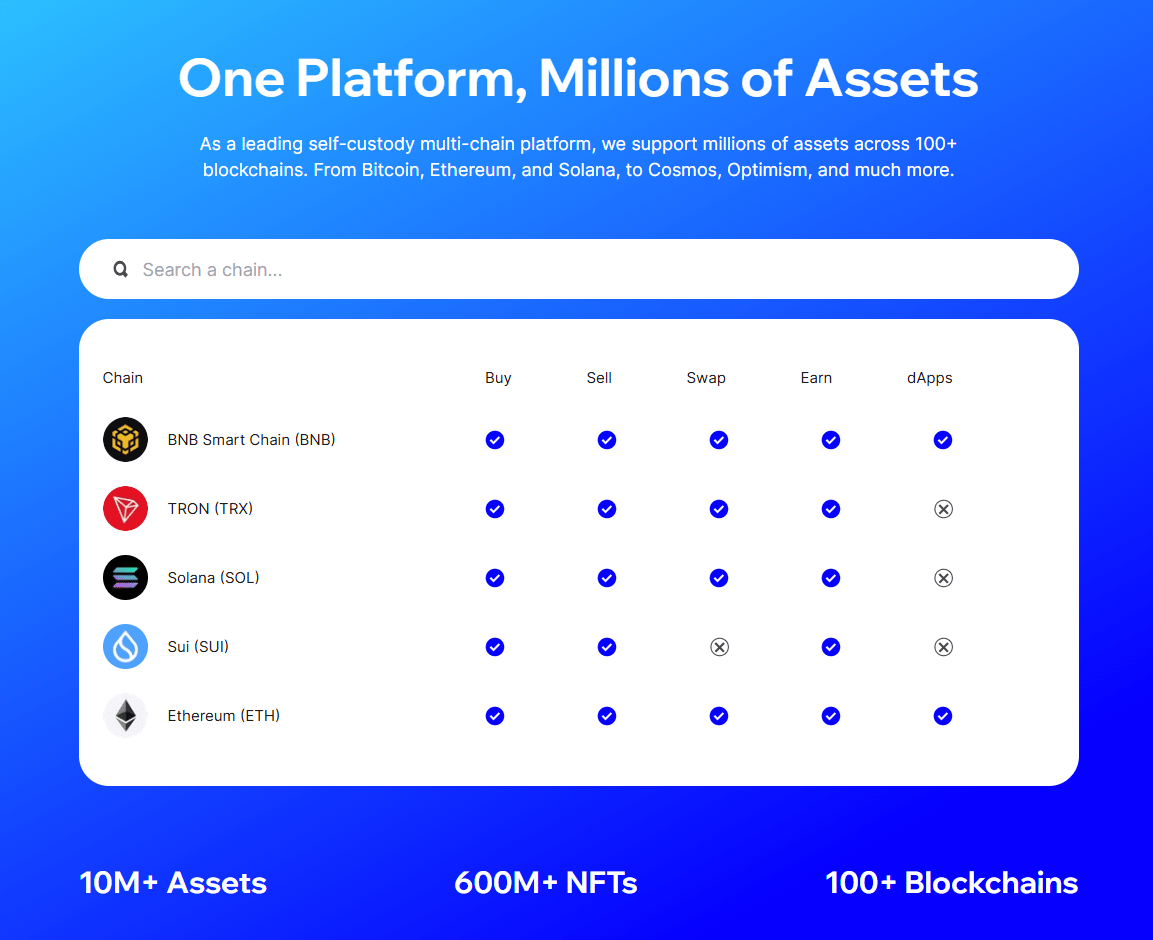
This wide asset support simplifies portfolio management by consolidating holdings in one place. Users can store, view, and transfer cryptocurrencies and NFTs without switching wallets. Trust Wallet’s compatibility with many blockchain networks also allows interaction with a variety of decentralized applications. Whether you want to hold mainstream coins or explore emerging tokens and NFT projects, Trust Wallet offers a unified platform.
Trust Wallet emphasizes ease of use across its mobile app and browser extension. The design is clean and intuitive, allowing users to quickly add tokens, check balances, and execute transactions. Clear menus and helpful prompts guide both newcomers and experienced users through wallet setup, backups, and daily management.
The integrated Web3 browser simplifies access to decentralized apps without leaving the wallet. This direct connectivity reduces complexity for users interested in DeFi, NFT marketplaces, or gaming platforms. Additionally, Trust Wallet offers step-by-step guides and explanations to support users who are new to cryptocurrencies.
Despite being feature-rich, the wallet maintains a straightforward experience. The app’s performance is smooth, with quick load times and responsive navigation. This ease of interaction encourages frequent use and reduces barriers for those unfamiliar with crypto technology.
Trust Wallet’s swap feature allows users to exchange cryptocurrencies directly within the app or extension. It supports more than a million trading pairs by routing orders through multiple decentralized exchanges. This approach helps find competitive rates and lower gas fees compared to executing swaps manually across different platforms.
The wallet does not charge fees for swaps. Users pay network gas fees and any fees imposed by third-party liquidity providers. To protect users from price fluctuations, Trust Wallet applies slippage controls and distributes orders across exchanges to minimize impact on prices.
Besides swapping, Trust Wallet facilitates buying cryptocurrencies with fiat. It partners with services like MoonPay and Simplex to enable purchases using credit or debit cards. Supported payment methods include Apple Pay, Google Pay, and bank transfers, making the process convenient.
Trust Wallet offers staking options for over 25 cryptocurrencies, allowing users to earn rewards by locking their assets. Supported tokens include popular options such as Tron, Tezos, Cosmos, Binance Coin, Cardano, and Solana.
Staking rewards vary by asset and network conditions but provide a way to generate passive income. The wallet makes staking straightforward, with clear displays of expected annual returns and flexible withdrawal options.
Users can start staking with just a few taps, without leaving the app. Trust Wallet also features an earnings estimator, helping users understand potential rewards before committing their tokens.
Visit Trust Wallet
Trust Wallet stores private keys locally on your device. These keys are encrypted using AES standards, which keeps them secure even if the device is compromised. Because it is non-custodial, only you control the private keys, and Trust Wallet never has access to your funds.
Access to the wallet is protected by a PIN code or biometric locks such as fingerprint or Face ID, depending on your device. This adds a layer of security against unauthorized use. The wallet also includes a security scanner that checks transaction addresses for potential phishing or scams. It alerts users if a risk is detected before they approve a transaction.
One important limitation is that Trust Wallet does not support two-factor authentication (2FA). Many wallets and exchanges use 2FA to require a second verification step during login or transactions. Without 2FA, Trust Wallet users must rely more heavily on device security and safe handling of recovery phrases to protect their assets.
As a hot wallet, Trust Wallet connects to the internet, which inherently carries more risk than cold wallets that store keys offline. Hot wallets offer convenience for active use and dApp interaction but remain vulnerable to malware, phishing, and device theft. Cold wallets, such as Ledger or Trezor, isolate keys from online exposure, reducing attack surfaces significantly.
Trust Wallet has maintained a relatively clean security record. In late 2022, it patched a vulnerability affecting new wallet addresses created during a short period. The team reimbursed affected users promptly. A separate incident in early 2023 involved a user losing funds due to social engineering, not a wallet breach. Trust Wallet has since strengthened its monitoring and alert systems to help prevent similar cases.
Trust Wallet does not charge users any fees to download, install, or use the wallet. There are no subscription or maintenance costs. Managing your assets within the wallet, including sending, receiving, or holding cryptocurrencies, is free.
When you send crypto from Trust Wallet, you pay network fees, often called gas fees. These fees go directly to blockchain miners or validators to process and confirm transactions. The amount varies depending on network congestion and the specific cryptocurrency. Trust Wallet informs users about the estimated network fee before confirming any transaction.
Swapping tokens within Trust Wallet comes without additional wallet fees. The wallet routes orders through decentralized exchanges to find the best rates and minimize gas costs. However, network fees and fees charged by third-party liquidity providers still apply. These costs depend on market conditions and the chosen swap path.
Buying cryptocurrencies with fiat currencies via Trust Wallet involves third-party payment processors such as MoonPay, Simplex, and Ramp. These services charge their own fees, which typically range between 3.5% and 5% per transaction. Trust Wallet itself does not add extra charges for fiat purchases.
Trust Wallet now also has Trust Premium, a loyalty program built around wallet activity and TWT locking. Depending on the tier, users may unlock perks such as gas-fee discounts when paying in TWT, swap-fee discounts, selected buy-fee discounts, and other partner rewards.
Staking assets via Trust Wallet carries no wallet fees. However, some staking protocols or pools may charge their own fees, which vary depending on the blockchain network.
Visit Trust Wallet
Getting started with Trust Wallet takes just a few minutes. Begin by downloading the app from the official website or your device’s app store. The wallet is available for both iOS and Android, with a browser extension for desktop users.
After installation, open the app and select “Create a New Wallet.” You’ll be prompted to set a PIN code or enable biometric access like fingerprint or Face ID to protect your wallet. This step secures your wallet from unauthorized use.
Next, the app will generate a 12-word recovery phrase. This phrase is crucial—it serves as the only backup for your wallet. Write it down on paper or use a dedicated seed phrase storage device. Never store it digitally or share it with anyone. Losing this phrase means losing access to your funds permanently. Confirm the phrase by selecting the words in the correct order to complete setup.
Once your wallet is ready, you can add cryptocurrencies by importing existing wallets with seed phrases or by selecting tokens from the extensive list supported by Trust Wallet. The app lets you manage multiple wallets simultaneously (up to 15 wallets) so you can organize different portfolios or separate personal and business assets easily. Access this feature under Settings > Manage Wallets.
Managing assets is straightforward. You can send, receive, swap tokens, and stake supported coins all within the app or browser extension. The built-in Web3 browser allows you to connect to decentralized applications like NFT marketplaces or DeFi platforms without leaving the wallet.
If you ever lose your device or need to reinstall, restoring your wallet is simple. Just select “Import Wallet” and enter your 12-word recovery phrase. This process brings back all your assets and settings.
Hardware wallets like Ledger Nano X and Trezor offer stronger cold-storage security because private keys stay offline. Trust Wallet can also connect with Ledger through the browser extension, but Ledger support is currently focused on EVM-compatible chains. However, they require physical devices and can be less convenient for frequent transactions or dApp interactions.
MetaMask excels in Ethereum and compatible chains with strong dApp integration and 2FA support through browser extensions. It lacks the multi-blockchain asset range of Trust Wallet but suits users focused on Ethereum-based ecosystems. Phantom is still the go to wallet for Solana-based users.
DeFi and NFT enthusiasts appreciate Trust Wallet’s integrated Web3 browser and extensive asset support. The wallet allows direct interaction with decentralized applications and marketplaces, enabling token swaps, staking, and NFT management within a single app. This all-in-one approach appeals to users active in the growing decentralized ecosystem who seek flexibility and broad blockchain coverage.
Users with small to medium crypto holdings also find Trust Wallet practical for everyday use. Its zero wallet fees and efficient in-app tools make managing and growing assets straightforward.
However, Trust Wallet is less suited for individuals prioritizing the highest levels of security. Its hot wallet nature exposes private keys to online risks, and the lack of two-factor authentication increases vulnerability to phishing or device theft. Users holding large amounts of cryptocurrency or those managing funds requiring strong protection should consider cold wallets. Hardware wallets like Ledger or Trezor provide offline key storage and additional security layers that Trust Wallet does not offer.
| User type | Is Trust Wallet a good fit? | Why |
|---|---|---|
| Multi-chain users | Yes | Supports 100+ blockchains and over 10 million digital assets |
| DeFi and NFT users | Yes | Built-in Web3 access, swaps, staking, and NFT support |
| Beginners | Mostly yes | Simple setup, mobile-first design, and clear recovery flow |
| Large long-term holders | Better as a companion wallet | Hot wallet risk makes cold storage safer for large balances |
| Users who want account recovery | No | Losing the 12-word recovery phrase can mean permanent loss of access |
Trust Wallet stands out as a versatile and accessible hot wallet for 2026. Its support for millions of tokens across more than 100 blockchains gives users the flexibility to manage diverse portfolios within a single app. The mobile-first design, built-in swapping, staking, and Web3 browser make it a strong choice for users actively engaging with DeFi, NFTs, and multiple decentralized platforms.
Security measures such as local key encryption and biometric or PIN protection provide essential safeguards. However, the absence of two-factor authentication and the inherent risks of being a hot wallet mean users must remain vigilant about device security and seed phrase protection. Trust Wallet’s limited customer support and occasional presence of low-quality tokens add considerations for less experienced users.
For newcomers and mobile users seeking convenience and broad asset access, Trust Wallet delivers a reliable, cost-free solution. Those with larger holdings or high-security needs should consider pairing it with hardware wallets or opting for cold storage alternatives.
Visit Trust Wallet
Trust Wallet was created by Viktor Radchenko in 2017. Binance, one of the largest cryptocurrency exchanges, acquired it in 2018. It operates independently but benefits from Binance’s resources.
Trust Wallet keeps your private keys encrypted locally on your device, giving you full control. It includes PIN and biometric locks and a security scanner. However, it is a hot wallet and does not support two-factor authentication, so device security is critical.
No, Trust Wallet currently does not offer 2FA. Users must rely on device-level security and safe handling of recovery phrases to protect their assets.
Losing your 12-word recovery phrase means you will lose access to your wallet and funds permanently. It is essential to back up the phrase offline in a safe location and never share it with anyone.
No. Trust Wallet is a non-custodial hot wallet independent of Binance’s exchange wallets. Binance Wallet is a custodial wallet tied to Binance accounts, while Trust Wallet gives users direct control over private keys.
Yes, Trust Wallet supports staking for over 25 cryptocurrencies. You can earn rewards by locking tokens within the wallet, with an earnings estimator to help gauge potential returns.
Yes, Trust Wallet supports NFTs on multiple blockchains like Ethereum and Binance Smart Chain. You can view, store, and transfer NFTs directly in the wallet.
The wallet itself is free. You pay blockchain network fees when sending transactions, and third-party fees may apply for swaps and fiat purchases. Trust Premium may also offer fee-related perks depending on user tier and TWT locking.
Yes, Trust Wallet integrates with Ledger devices, allowing you to use hardware wallets for offline key storage while managing assets through Trust Wallet’s interface.
Never share your recovery phrase or private keys. Verify official communications through Trust Wallet’s website or app notifications. Use the security scanner before approving transactions and avoid using public Wi-Fi for sensitive operations.
Visit Trust WalletSubscribe to our newsletter, you are in very good company










 Canada
  Australia